NotebookLM: a Good Place to Think With Your Sources
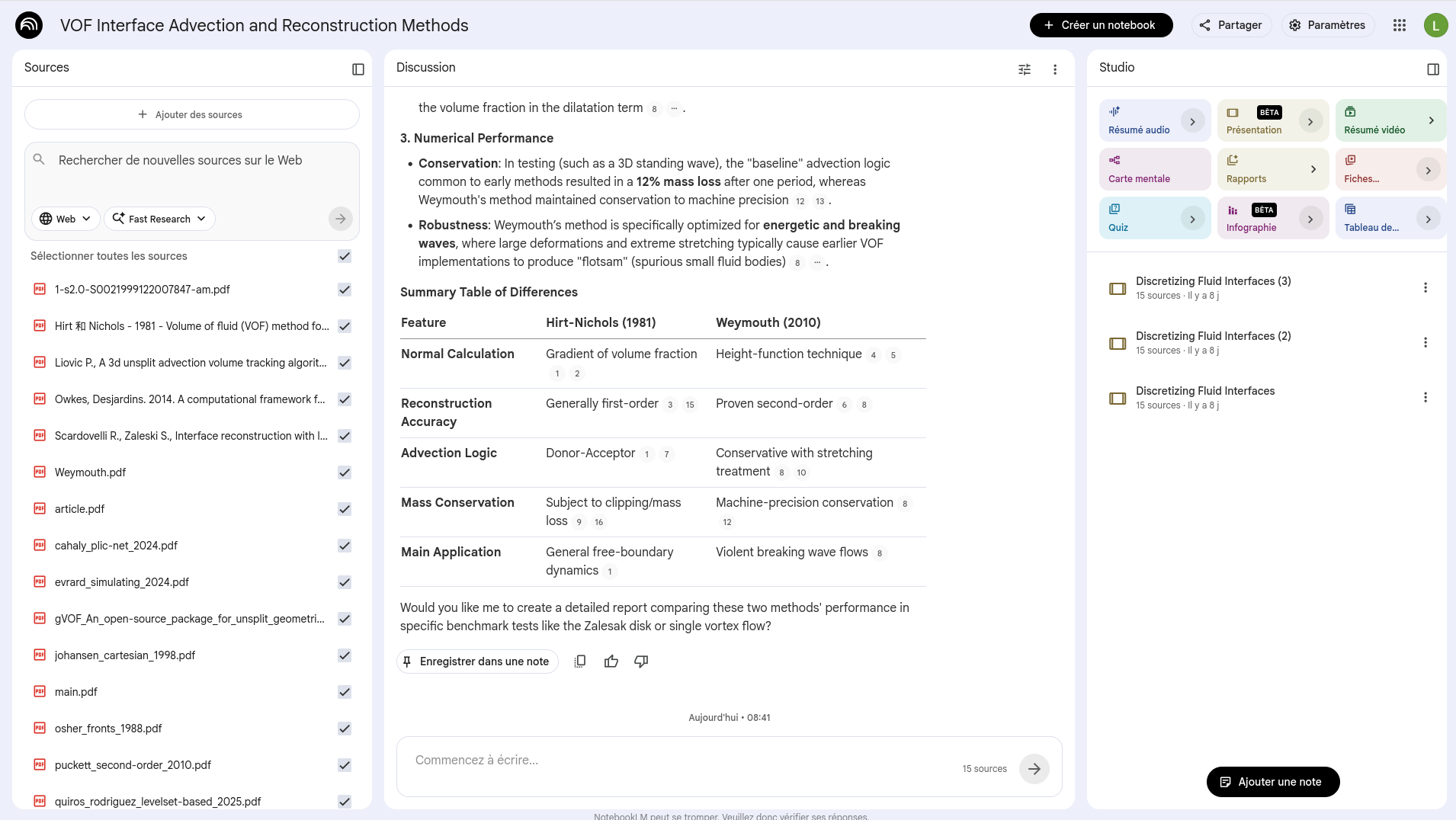
I was initially skeptical about NotebookLM, mostly because “chat with your documents” sounds like a feature every AI product claims to have. After using this kind of tool more seriously, I think the interesting part is not the chat. It is the fact that the conversation is constrained by a pile of sources that you chose yourself.
That changes the feeling of the workflow. Instead of opening a generic chatbot and hoping it remembers the right thing, you build a small working library: papers, web pages, YouTube videos, audio files, Google Docs, slides, Markdown notes, CSV files, images, or PDFs. Then you ask questions inside that library. The answers are still generated by an AI model, so they still need checking, but the citations make the checking much less painful.
I would not use it as a place to store my final notes. I would use it as a temporary desk: a space where I can throw a focused set of documents, ask messy questions, generate first drafts of summaries, and then move the useful parts back into Obsidian, Git, or a project README.
Where it fits in a research workflow
The unit that makes sense to me is one notebook per real question, not one notebook for everything. A notebook for a numerical-methods paper could contain the submitted manuscript, two or three related papers, implementation notes, validation cases, and meeting notes. A teaching notebook could contain slides, exercises, references, and the questions that tend to come back every year.
The workflow I like is simple:
- Add only the sources that define the current question.
- Ask for a rough map: main concepts, disagreements, missing definitions, and recurring assumptions.
- Use follow-up questions to compare sources, not only summarize them.
- Generate a few artifacts: a briefing doc, a mind map, a quiz, or an audio overview.
- Copy the useful conclusions somewhere durable.
The last step matters. If a conclusion is important, it should not only live in a NotebookLM chat history. It should end up in a note, a commit, a paper draft, or a task list.
Small habits that help
Use fewer sources than you think. NotebookLM supports quite large notebooks, but the answers are better when the source set is intentional. For a literature review, I prefer comparing two or three papers first, then asking for a global synthesis once the local comparisons are clear.
Ask for disagreement. “Summarize this” is rarely the best prompt. More useful questions are: “Which assumptions differ across these sources?”, “Which results are not directly comparable?”, “What would break if this boundary condition changed?”, or “Which claims are repeated but not really justified?”
Mention source names. When several documents are active, naming the documents in the prompt makes the answer easier to audit. It also reduces the risk of getting a smooth average of several incompatible texts.
Use the generated artifacts for different jobs. Audio Overviews are good for passive review, especially before a meeting or during a commute. Mind Maps are useful for seeing whether the source set has a structure. Flashcards and quizzes are better when the goal is recall. None of these outputs should be treated as final, but they are good first passes.
Customize the output. Audio Overviews can be steered by format, language, length, focus, and expertise level. A two-minute briefing for a collaborator should not use the same prompt as a critical review of a draft paper.
Keep a verification pass. NotebookLM can still make mistakes, and Google explicitly warns that generated audio may contain inaccuracies. I treat every generated summary as an index into the sources, not as a substitute for reading them.
Prompts I would actually use
For papers, start with:
Extract the research question, model assumptions, numerical method,
validation cases, limitations, and claims that require checking.
Return citations for each important claim.
For meetings:
Turn these notes into decisions, open questions, owners, and follow-up tasks.
Separate facts from interpretation.
For teaching:
Create a study guide from these sources.
Then create ten quiz questions at three difficulty levels.
For each answer, cite the source section that supports it.
For writing:
Compare this draft with the source material.
Find unsupported claims, missing citations, repeated ideas, and unclear transitions.
Limits to remember
The free tier has finite limits: Google lists 100 notebooks, up to 50 sources per notebook, sources up to 500,000 words, and daily limits on chat and audio generations. Local uploads can be up to 200 MB per source. These limits are generous enough for many research tasks, but they still push toward a useful discipline: keep notebooks focused.
The more subtle limit is conceptual. NotebookLM is strong when the source set is well chosen. It is weaker when the notebook becomes a vague dumping ground. The quality of the answer depends first on the quality of the small library you build.
For me, that is the right mental model: not an oracle, not a replacement for a reference manager, not a final note-taking system. Just a useful workbench for thinking with sources before writing something more permanent.
Sources
- Google NotebookLM Help: Learn about NotebookLM
- Google NotebookLM Help: Add or discover new sources
- Google NotebookLM Help: Frequently asked questions
- Google NotebookLM Help: Audio Overviews
- Google NotebookLM Help: Mind Maps
- Google Blog: NotebookLM learning features
- Google Blog: Video Overviews and Studio upgrades
- Google Blog: Better research with NotebookLM