<?xml version="1.0" encoding="utf-8"?><feed xmlns="http://www.w3.org/2005/Atom" ><generator uri="https://jekyllrb.com/" version="3.10.0">Jekyll</generator><link href="https://fastaxx.github.io/feed.xml" rel="self" type="application/atom+xml" /><link href="https://fastaxx.github.io/" rel="alternate" type="text/html" /><updated>2026-07-13T17:40:27+00:00</updated><id>https://fastaxx.github.io/feed.xml</id><title type="html">Louis Libat</title><subtitle>Computational fluid dynamics, numerical methods, scientific machine learning, and research software.</subtitle><entry><title type="html">LLM Wiki and Obsidian: a Research Notebook That Compounds</title><link href="https://fastaxx.github.io/2026/06/18/llmwiki-obsidian-research-notebook.html" rel="alternate" type="text/html" title="LLM Wiki and Obsidian: a Research Notebook That Compounds" /><published>2026-06-18T08:00:00+00:00</published><updated>2026-06-18T08:00:00+00:00</updated><id>https://fastaxx.github.io/2026/06/18/llmwiki-obsidian-research-notebook</id><content type="html" xml:base="https://fastaxx.github.io/2026/06/18/llmwiki-obsidian-research-notebook.html"><![CDATA[<p><img src="/assets/img/llmwiki-obsidian/obsidian.png" alt="Obsidian graph view for an LLM wiki" /></p>

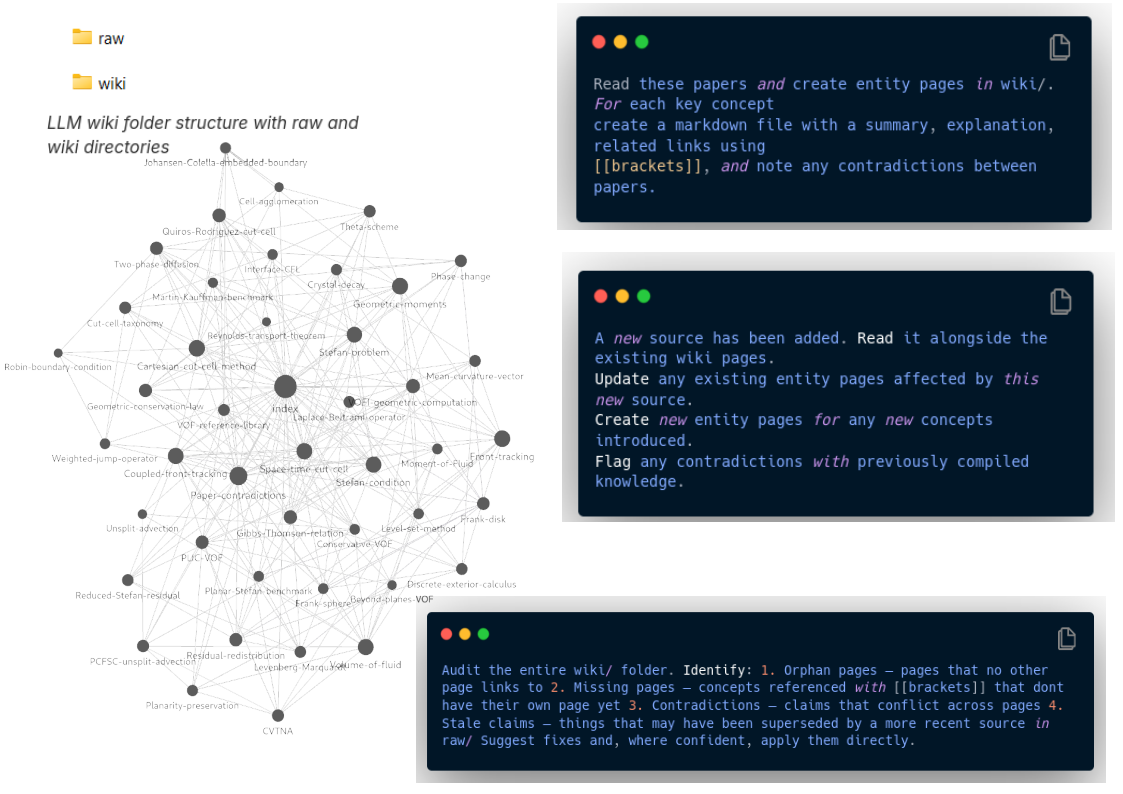
<p>Research notes usually fail in one of two ways. Either they are raw archives, full of PDFs and copied links that are easy to store but hard to reuse, or they are polished notes that take too much time to maintain. An LLM wiki is an interesting middle ground: keep the sources as they are, but ask a language model to compile them into small, linked Markdown pages that can be opened in Obsidian.</p>

<p>The idea is simple. A folder contains the original material: papers, technical reports, meeting notes, links exported as Markdown, or old project notes. Another folder contains the wiki itself. Each page explains one concept, method, dataset, equation, software component, or decision. Pages link to one another using <code class="language-plaintext highlighter-rouge">[[wiki links]]</code>, so Obsidian can display the structure as a graph and make navigation natural.</p>

<p>This is different from using a chatbot as a search box over a pile of files. Retrieval-augmented generation is useful when the goal is to answer a question from documents. The LLM wiki pattern adds a compilation step: after a new source is added, the model updates existing pages, creates missing pages, links related concepts, and flags contradictions. The knowledge base changes over time instead of being recomputed from scratch at every question.</p>

<p>For research work, that distinction matters. A PhD topic, numerical method, or code base is not a static set of documents. It is a growing network of assumptions, experiments, failures, definitions, and decisions. A good wiki page on a numerical method should not only summarize one paper; it should also point to the equations used in the code, the boundary conditions that caused trouble, the datasets used for validation, and the open questions that remain.</p>

<h2 id="a-practical-folder-layout">A practical folder layout</h2>

<p>I would start with a deliberately small structure:</p>

<div class="language-text highlighter-rouge"><div class="highlight"><pre class="highlight"><code>research-wiki/
  raw/
    papers/
    notes/
    meetings/
  wiki/
    index.md
    log.md
    concepts/
    methods/
    projects/
</code></pre></div></div>

<p>The <code class="language-plaintext highlighter-rouge">raw/</code> folder is append-only. It is the evidence base: PDFs, Markdown exports, notes, and transcripts. The <code class="language-plaintext highlighter-rouge">wiki/</code> folder is the compiled layer. It should be readable without opening the raw files every time.</p>

<p>The two most useful files are <code class="language-plaintext highlighter-rouge">index.md</code> and <code class="language-plaintext highlighter-rouge">log.md</code>. The index gives a short map of the wiki: main topics, important pages, and unresolved questions. The log records what was added, when, and which pages were modified. Without a log, it becomes difficult to know whether a page reflects last week’s sources or last year’s understanding.</p>

<h2 id="what-to-ask-the-model-to-do">What to ask the model to do</h2>

<p>The prompt should be explicit about structure and uncertainty. A useful instruction is not “summarize these papers”; it is closer to:</p>

<div class="language-text highlighter-rouge"><div class="highlight"><pre class="highlight"><code>Read the new files in raw/.
Update the Markdown wiki in wiki/.
Create one page per concept, method, dataset, software component, or important result.
Use Obsidian-style [[links]] between related pages.
When updating an existing page, preserve useful prior content and add new source-backed details.
Flag contradictions, missing definitions, and claims that need verification.
Update index.md and log.md.
Do not invent citations or results that are not present in the sources.
</code></pre></div></div>

<p>The last line is important. An LLM wiki is only useful if it remains humble. It should expose weak links, not hide them behind fluent prose.</p>

<h2 id="why-obsidian-fits-well">Why Obsidian fits well</h2>

<p>Obsidian works because it does not require a database or a special export format. The wiki is just Markdown files in folders. This keeps the notes portable and easy to version with Git. The graph view is also useful, not as decoration, but as a debugging tool: isolated pages reveal topics that are not connected; over-connected pages often mean that a concept should be split; clusters show where a project has become mature enough to deserve its own index.</p>

<p>Obsidian also keeps the human in the loop. The model can draft and maintain pages, but the researcher should still review important claims, rename pages, merge duplicates, and decide which contradictions are real. The workflow is better understood as assisted editorial work than as automatic knowledge management.</p>

<h2 id="maintenance-rules">Maintenance rules</h2>

<p>The wiki needs occasional linting. Every few additions, ask the model to inspect the compiled pages and report:</p>

<ul>
  <li>duplicate pages with different names;</li>
  <li>pages that mix several concepts and should be split;</li>
  <li>pages with no incoming or outgoing links;</li>
  <li>claims without a source;</li>
  <li>contradictions between pages;</li>
  <li>obsolete statements that newer sources have superseded.</li>
</ul>

<p>This audit pass is where the system starts to compound. The value is not only in producing more notes, but in making old notes easier to reuse.</p>

<h2 id="where-this-is-useful">Where this is useful</h2>

<p>I would use this pattern for subjects that evolve over months: literature reviews, numerical methods, software architecture notes, experiment logs, or teaching material. It is less appropriate for information that changes daily or for situations where every sentence needs a precise citation trail. In those cases, a conventional search index or a stricter reference manager is still better.</p>

<p>The promising part is the combination of boring files and active maintenance. Markdown keeps the system inspectable. Obsidian makes it navigable. The LLM does the repetitive compilation work. The researcher keeps responsibility for judgment.</p>

<p>Inspired by the Data Science Dojo tutorial on the <a href="https://datasciencedojo.com/blog/llm-wiki-tutorial/">LLM wiki pattern</a>, but adapted here for a research notebook workflow with Obsidian and Git.</p>]]></content><author><name></name></author><category term="LLM" /><category term="Obsidian" /><category term="research" /><category term="knowledge-management" /><category term="wiki" /><summary type="html"><![CDATA[]]></summary><media:thumbnail xmlns:media="http://search.yahoo.com/mrss/" url="https://fastaxx.github.io/assets/img/llmwiki-obsidian/obsidian.png" /><media:content medium="image" url="https://fastaxx.github.io/assets/img/llmwiki-obsidian/obsidian.png" xmlns:media="http://search.yahoo.com/mrss/" /></entry><entry><title type="html">NotebookLM: a Good Place to Think With Your Sources</title><link href="https://fastaxx.github.io/2026/05/20/notebooklm-research-workflow.html" rel="alternate" type="text/html" title="NotebookLM: a Good Place to Think With Your Sources" /><published>2026-05-20T08:00:00+00:00</published><updated>2026-05-20T08:00:00+00:00</updated><id>https://fastaxx.github.io/2026/05/20/notebooklm-research-workflow</id><content type="html" xml:base="https://fastaxx.github.io/2026/05/20/notebooklm-research-workflow.html"><![CDATA[<p><img src="/assets/img/notebooklm/notebooklm.png" alt="NotebookLM research workspace" /></p>

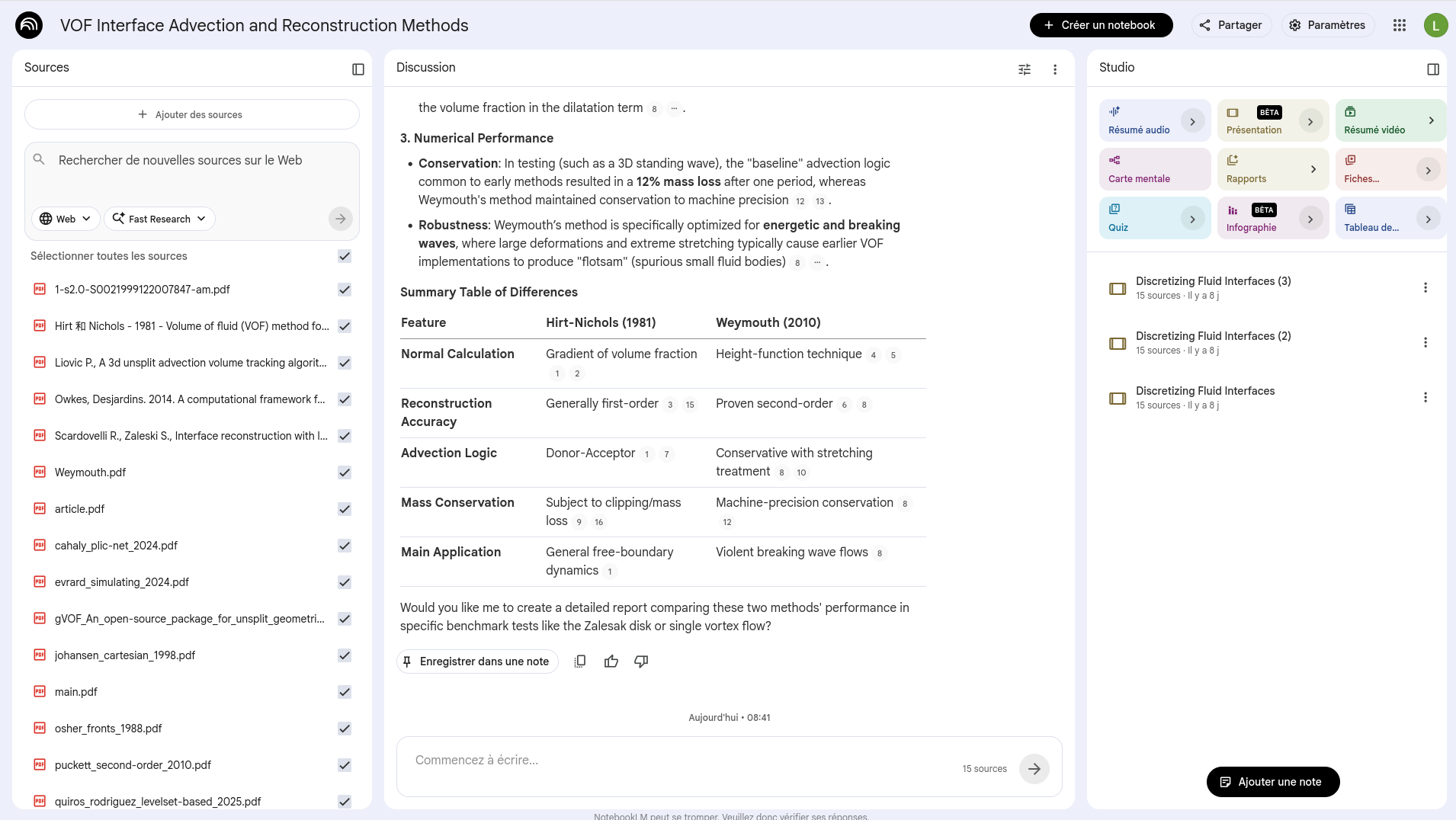
<p>I was initially skeptical about NotebookLM, mostly because “chat with your documents” sounds like a feature every AI product claims to have. After using this kind of tool more seriously, I think the interesting part is not the chat. It is the fact that the conversation is constrained by a pile of sources that you chose yourself.</p>

<p>That changes the feeling of the workflow. Instead of opening a generic chatbot and hoping it remembers the right thing, you build a small working library: papers, web pages, YouTube videos, audio files, Google Docs, slides, Markdown notes, CSV files, images, or PDFs. Then you ask questions inside that library. The answers are still generated by an AI model, so they still need checking, but the citations make the checking much less painful.</p>

<p>I would not use it as a place to store my final notes. I would use it as a temporary desk: a space where I can throw a focused set of documents, ask messy questions, generate first drafts of summaries, and then move the useful parts back into Obsidian, Git, or a project README.</p>

<h2 id="where-it-fits-in-a-research-workflow">Where it fits in a research workflow</h2>

<p>The unit that makes sense to me is one notebook per real question, not one notebook for everything. A notebook for a numerical-methods paper could contain the submitted manuscript, two or three related papers, implementation notes, validation cases, and meeting notes. A teaching notebook could contain slides, exercises, references, and the questions that tend to come back every year.</p>

<p>The workflow I like is simple:</p>

<ol>
  <li>Add only the sources that define the current question.</li>
  <li>Ask for a rough map: main concepts, disagreements, missing definitions, and recurring assumptions.</li>
  <li>Use follow-up questions to compare sources, not only summarize them.</li>
  <li>Generate a few artifacts: a briefing doc, a mind map, a quiz, or an audio overview.</li>
  <li>Copy the useful conclusions somewhere durable.</li>
</ol>

<p>The last step matters. If a conclusion is important, it should not only live in a NotebookLM chat history. It should end up in a note, a commit, a paper draft, or a task list.</p>

<h2 id="small-habits-that-help">Small habits that help</h2>

<p>Use fewer sources than you think. NotebookLM supports quite large notebooks, but the answers are better when the source set is intentional. For a literature review, I prefer comparing two or three papers first, then asking for a global synthesis once the local comparisons are clear.</p>

<p>Ask for disagreement. “Summarize this” is rarely the best prompt. More useful questions are: “Which assumptions differ across these sources?”, “Which results are not directly comparable?”, “What would break if this boundary condition changed?”, or “Which claims are repeated but not really justified?”</p>

<p>Mention source names. When several documents are active, naming the documents in the prompt makes the answer easier to audit. It also reduces the risk of getting a smooth average of several incompatible texts.</p>

<p>Use the generated artifacts for different jobs. Audio Overviews are good for passive review, especially before a meeting or during a commute. Mind Maps are useful for seeing whether the source set has a structure. Flashcards and quizzes are better when the goal is recall. None of these outputs should be treated as final, but they are good first passes.</p>

<p>Customize the output. Audio Overviews can be steered by format, language, length, focus, and expertise level. A two-minute briefing for a collaborator should not use the same prompt as a critical review of a draft paper.</p>

<p>Keep a verification pass. NotebookLM can still make mistakes, and Google explicitly warns that generated audio may contain inaccuracies. I treat every generated summary as an index into the sources, not as a substitute for reading them.</p>

<h2 id="prompts-i-would-actually-use">Prompts I would actually use</h2>

<p>For papers, start with:</p>

<div class="language-text highlighter-rouge"><div class="highlight"><pre class="highlight"><code>Extract the research question, model assumptions, numerical method,
validation cases, limitations, and claims that require checking.
Return citations for each important claim.
</code></pre></div></div>

<p>For meetings:</p>

<div class="language-text highlighter-rouge"><div class="highlight"><pre class="highlight"><code>Turn these notes into decisions, open questions, owners, and follow-up tasks.
Separate facts from interpretation.
</code></pre></div></div>

<p>For teaching:</p>

<div class="language-text highlighter-rouge"><div class="highlight"><pre class="highlight"><code>Create a study guide from these sources.
Then create ten quiz questions at three difficulty levels.
For each answer, cite the source section that supports it.
</code></pre></div></div>

<p>For writing:</p>

<div class="language-text highlighter-rouge"><div class="highlight"><pre class="highlight"><code>Compare this draft with the source material.
Find unsupported claims, missing citations, repeated ideas, and unclear transitions.
</code></pre></div></div>

<h2 id="limits-to-remember">Limits to remember</h2>

<p>The free tier has finite limits: Google lists 100 notebooks, up to 50 sources per notebook, sources up to 500,000 words, and daily limits on chat and audio generations. Local uploads can be up to 200 MB per source. These limits are generous enough for many research tasks, but they still push toward a useful discipline: keep notebooks focused.</p>

<p>The more subtle limit is conceptual. NotebookLM is strong when the source set is well chosen. It is weaker when the notebook becomes a vague dumping ground. The quality of the answer depends first on the quality of the small library you build.</p>

<p>For me, that is the right mental model: not an oracle, not a replacement for a reference manager, not a final note-taking system. Just a useful workbench for thinking with sources before writing something more permanent.</p>

<h2 id="sources">Sources</h2>

<ul>
  <li><a href="https://support.google.com/notebooklm/answer/16164461">Google NotebookLM Help: Learn about NotebookLM</a></li>
  <li><a href="https://support.google.com/notebooklm/answer/16215270">Google NotebookLM Help: Add or discover new sources</a></li>
  <li><a href="https://support.google.com/notebooklm/answer/16269187">Google NotebookLM Help: Frequently asked questions</a></li>
  <li><a href="https://support.google.com/notebooklm/answer/16212820">Google NotebookLM Help: Audio Overviews</a></li>
  <li><a href="https://support.google.com/notebooklm/answer/16212283">Google NotebookLM Help: Mind Maps</a></li>
  <li><a href="https://blog.google/innovation-and-ai/models-and-research/google-labs/notebooklm-student-features/">Google Blog: NotebookLM learning features</a></li>
  <li><a href="https://blog.google/innovation-and-ai/models-and-research/google-labs/notebooklm-video-overviews-studio-upgrades/">Google Blog: Video Overviews and Studio upgrades</a></li>
  <li><a href="https://blog.google/innovation-and-ai/products/notebooklm/better-research-notebooklm/">Google Blog: Better research with NotebookLM</a></li>
</ul>]]></content><author><name></name></author><category term="NotebookLM" /><category term="LLM" /><category term="research" /><category term="productivity" /><category term="knowledge-management" /><summary type="html"><![CDATA[]]></summary><media:thumbnail xmlns:media="http://search.yahoo.com/mrss/" url="https://fastaxx.github.io/assets/img/notebooklm/notebooklm.png" /><media:content medium="image" url="https://fastaxx.github.io/assets/img/notebooklm/notebooklm.png" xmlns:media="http://search.yahoo.com/mrss/" /></entry><entry><title type="html">AI Agent Usage Limits: How to Avoid Them</title><link href="https://fastaxx.github.io/2026/05/05/ai-agent-usage-limits.html" rel="alternate" type="text/html" title="AI Agent Usage Limits: How to Avoid Them" /><published>2026-05-05T09:00:00+00:00</published><updated>2026-05-05T09:00:00+00:00</updated><id>https://fastaxx.github.io/2026/05/05/ai-agent-usage-limits</id><content type="html" xml:base="https://fastaxx.github.io/2026/05/05/ai-agent-usage-limits.html"><![CDATA[<p><img src="/assets/img/ai-agent-usage/claude_session_management.jpeg" alt="Session management" /></p>

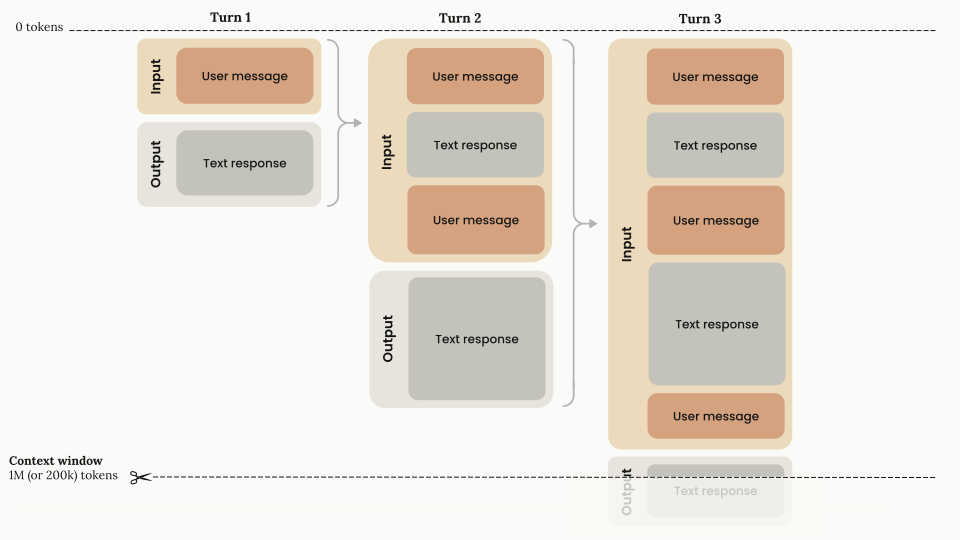
<p>AI agents have usage limits (tokens, iterations, budget, context window). They are normal, but you can push them back with good session hygiene and a few simple technical choices.</p>

<h2 id="why-you-hit-the-limits">Why You Hit the Limits</h2>

<ul>
  <li><strong>Cache misses</strong>: switching models or tools too often invalidates the cache.</li>
  <li><strong>Context bloat</strong>: too many files reread, too much unnecessary history.</li>
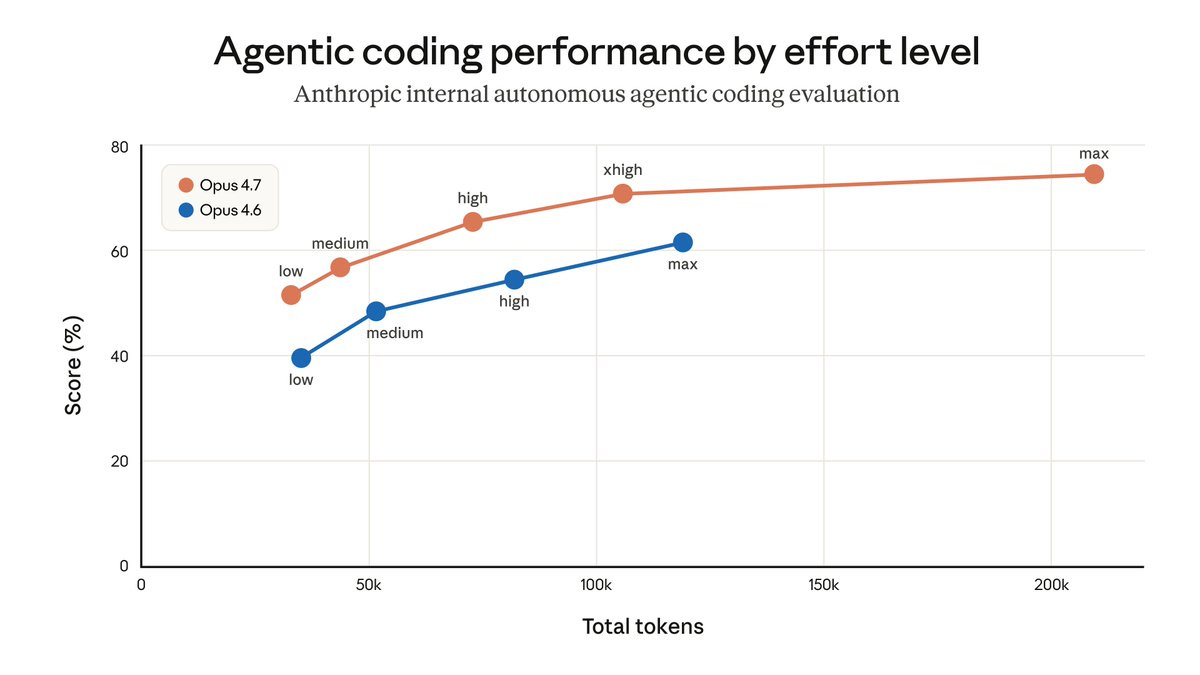
  <li><strong>Wrong effort</strong>: using a large model for a grep or formatting task.</li>
  <li><strong>Bad input format</strong>: unoptimized images/PDFs burn tokens.</li>
</ul>

<p><img src="/assets/img/ai-agent-usage/claude_effort_tradeoff.jpeg" alt="Limits infographic" /></p>

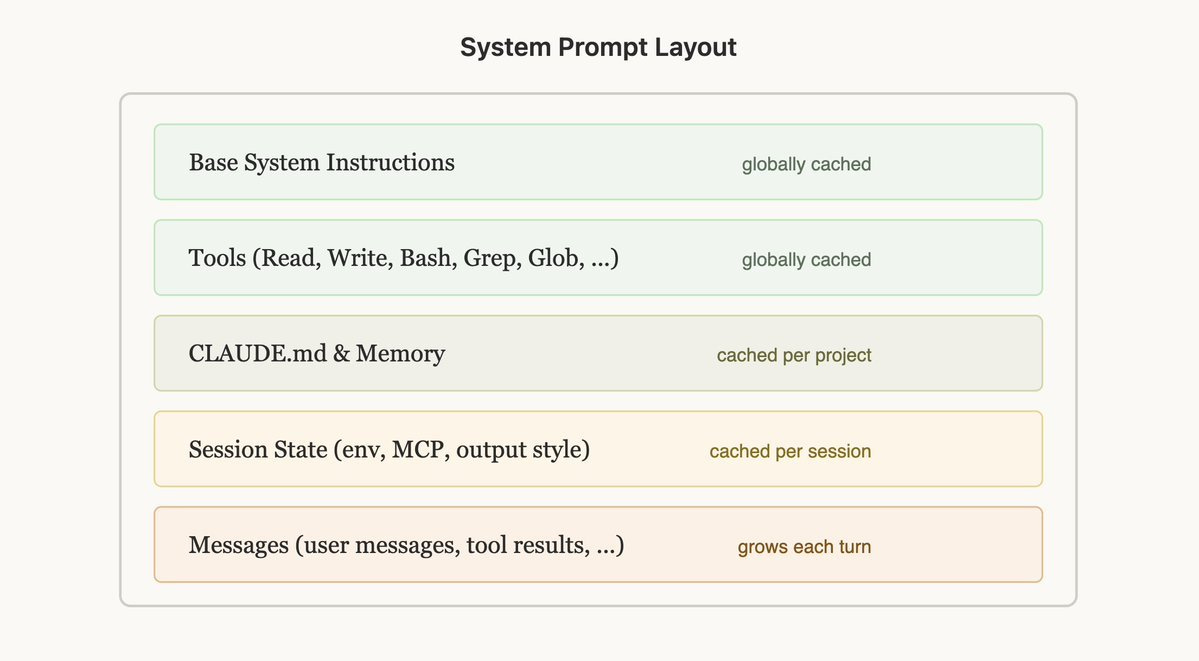
<h2 id="the-real-lever-protect-the-cached-prefix">The Real Lever: Protect the Cached Prefix</h2>

<ul>
  <li>Choose <strong>tools/MCP</strong> at the start and stick with them.</li>
  <li>Choose the <strong>model</strong> at the start and do not change <code class="language-plaintext highlighter-rouge">/model</code> mid-session.</li>
  <li>Keep <code class="language-plaintext highlighter-rouge">AGENTS.md</code> / <code class="language-plaintext highlighter-rouge">CLAUDE.md</code> <strong>short</strong>.</li>
  <li>Move the details into <code class="language-plaintext highlighter-rouge">MATH.md</code>, <code class="language-plaintext highlighter-rouge">TESTING.md</code>, <code class="language-plaintext highlighter-rouge">SKILL.md</code>.</li>
</ul>

<p><img src="/assets/img/ai-agent-usage/claude_prompt_cache_layout.jpeg" alt="Prompt cache" /></p>

<h2 id="session-hygiene-6-simple-habits">Session Hygiene: 6 Simple Habits</h2>

<ol>
  <li><strong><code class="language-plaintext highlighter-rouge">/clear</code> between topics</strong> to avoid stacking context.</li>
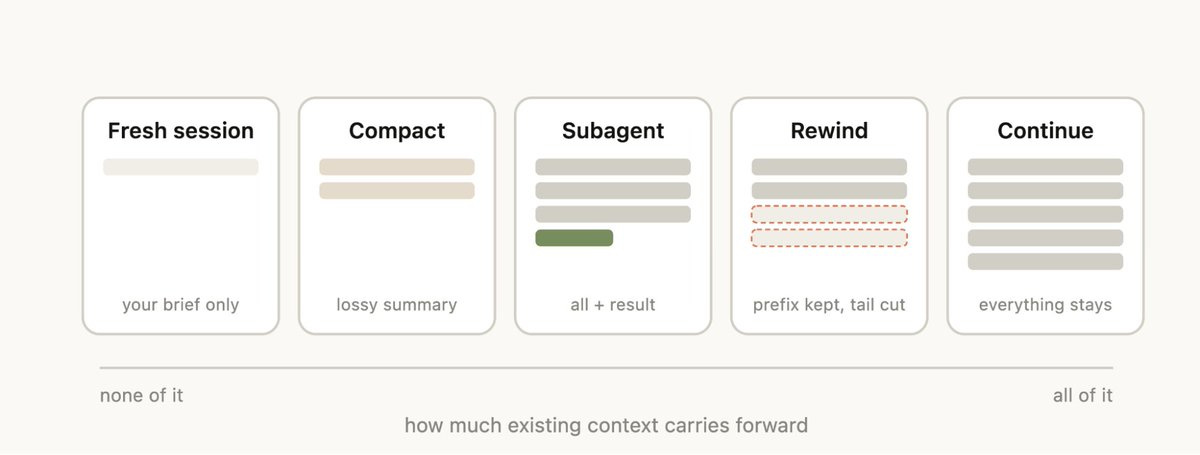
  <li><strong><code class="language-plaintext highlighter-rouge">/compact</code> after a task</strong> (or around 50-80% of the context).</li>
  <li><strong><code class="language-plaintext highlighter-rouge">/rewind</code> if the session goes bad</strong> instead of continuing to patch it.</li>
  <li><strong>Sub-agents</strong> for large reads, logs, PDFs, and file search.</li>
  <li><strong>Do not reread the whole repo</strong> for every request: point to the right folder/file.</li>
  <li><strong>Split tasks up</strong>: one clear action per message.</li>
</ol>

<p><img src="/assets/img/ai-agent-usage/claude_session_management.jpeg" alt="Session management" /></p>

<h2 id="choose-the-right-model-for-the-right-task">Choose the Right Model for the Right Task</h2>

<ul>
  <li><strong>Small model</strong>: grep, renaming, formatting.</li>
  <li><strong>Medium model</strong>: local exploration, tests, short synthesis.</li>
  <li><strong>Large model</strong>: architecture, tradeoffs, long-term decisions.</li>
</ul>

<h2 id="bad-format--burned-tokens">Bad Format = Burned Tokens</h2>

<ul>
  <li><strong>Web</strong>: prefer text / the accessibility tree over screenshots.</li>
  <li><strong>PDF</strong>: extract the text (<code class="language-plaintext highlighter-rouge">pdftotext</code>) before sending images.</li>
  <li><strong>Large repo</strong>: start from a map or graph rather than reading everything.</li>
</ul>

<p><img src="/assets/img/ai-agent-usage/context-window.svg" alt="Context window" /></p>

<h2 id="tldr">TL;DR</h2>

<ul>
  <li>Fix the model and tools at the start.</li>
  <li>Keep the context light.</li>
  <li>Clean up sessions.</li>
  <li>Use the right model at the right time.</li>
  <li>Optimize the source format.</li>
</ul>]]></content><author><name></name></author><category term="AI" /><category term="agents" /><category term="usage" /><category term="quotas" /><category term="productivity" /><summary type="html"><![CDATA[]]></summary><media:thumbnail xmlns:media="http://search.yahoo.com/mrss/" url="https://fastaxx.github.io/assets/img/ai-agent-usage/claude_session_management.jpeg" /><media:content medium="image" url="https://fastaxx.github.io/assets/img/ai-agent-usage/claude_session_management.jpeg" xmlns:media="http://search.yahoo.com/mrss/" /></entry><entry><title type="html">AI Agents &amp;amp; LLMs - 2026 Overview</title><link href="https://fastaxx.github.io/2026/05/05/agents-ia-llms-panorama-2026.html" rel="alternate" type="text/html" title="AI Agents &amp;amp; LLMs - 2026 Overview" /><published>2026-05-05T08:00:00+00:00</published><updated>2026-05-05T08:00:00+00:00</updated><id>https://fastaxx.github.io/2026/05/05/agents-ia-llms-panorama-2026</id><content type="html" xml:base="https://fastaxx.github.io/2026/05/05/agents-ia-llms-panorama-2026.html"><![CDATA[<p>An interactive overview of AI agents and LLMs, with filters by category, pricing, and use cases. The page below is the embedded version of <a href="assets/data/index.html">assets/data/index.html</a>.</p>

<div style="margin: 24px 0; border: 1px solid #e7e4df; border-radius: 12px; overflow: hidden; background: #fff;">
  <div style="background: #f9f7f3; padding: 10px 14px; font-size: 12px; font-family: 'Courier New', monospace; color: #78716c;">
    Interactive view
  </div>
  <div style="position: relative; width: 100%; padding-top: 75%;">
    <iframe src="/assets/data/index.html" title="AI Agents &amp; LLMs - 2026 Overview" style="position: absolute; inset: 0; width: 100%; height: 100%; border: 0;" loading="lazy" referrerpolicy="no-referrer"></iframe>
  </div>
</div>

<p>If you want to export or edit it, the source file is available in the repository.</p>]]></content><author><name></name></author><category term="IA" /><category term="agents" /><category term="LLM" /><category term="panorama" /><category term="comparatif" /><summary type="html"><![CDATA[An interactive overview of AI agents and LLMs, with filters by category, pricing, and use cases. The page below is the embedded version of assets/data/index.html.]]></summary></entry><entry><title type="html">From Paper to Implementation: Reading Numerical Methods With LLMs</title><link href="https://fastaxx.github.io/2026/03/24/from-paper-to-implementation.html" rel="alternate" type="text/html" title="From Paper to Implementation: Reading Numerical Methods With LLMs" /><published>2026-03-24T09:00:00+00:00</published><updated>2026-03-24T09:00:00+00:00</updated><id>https://fastaxx.github.io/2026/03/24/from-paper-to-implementation</id><content type="html" xml:base="https://fastaxx.github.io/2026/03/24/from-paper-to-implementation.html"><![CDATA[<p><img src="/assets/img/from-paper/climentpdf.png" alt="A benchmark paper opened before implementation" /></p>

<p>Turning a paper into code is never just “implement the paper.” At least, it should not be. A paper is full of equations, tables, assumptions, conventions, and shortcuts that made sense to the authors, but not necessarily to the next person trying to reproduce one part of it.</p>

<p>This is one place where AI agents are genuinely useful. Not because they magically understand the science, but because they are patient with the annoying first layer of work: reading PDFs, extracting equations, doing OCR when the text layer is bad, converting sections to Markdown, listing symbols, and comparing a paper against an existing code base.</p>

<p>The example I have in mind is my work on <a href="https://github.com/PenguinxCutCell/PenguinReactiveTransferClimentBenchmarks">PenguinReactiveTransferClimentBenchmarks</a>, a Julia benchmark package around scalar and coupled reactive transfer in the PenguinxCutCell ecosystem. The goal was not to make an impressive demo. The goal was more modest and more useful: take benchmark material from the literature, translate it into small reproducible cases, and make the result auditable.</p>

<h2 id="the-first-pass-is-reading">The first pass is reading</h2>

<p>The first useful task for the agent is not coding. It is reading the paper in a way that prepares coding.</p>

<p>I want it to extract:</p>

<ul>
  <li>the equations;</li>
  <li>the definitions of symbols;</li>
  <li>the nondimensional numbers;</li>
  <li>the boundary and interface conditions;</li>
  <li>the reference tables and figures;</li>
  <li>the assumptions that are easy to miss;</li>
  <li>the cases that are actually comparable with my solver.</li>
</ul>

<p>That last point matters. A table from a finite-Reynolds DNS paper is not automatically a validation target for a low-Re prescribed-velocity solver. It can be useful context, but it should not become an acceptance criterion if the physics solved by the code is different.</p>

<p>This is where PDF handling matters. Sometimes the equation text is selectable. Sometimes it is not. Sometimes a table needs OCR. Sometimes the cleanest path is to ask the agent to convert a few pages into Markdown, then manually check the equations before going further. That manual check is not optional.</p>

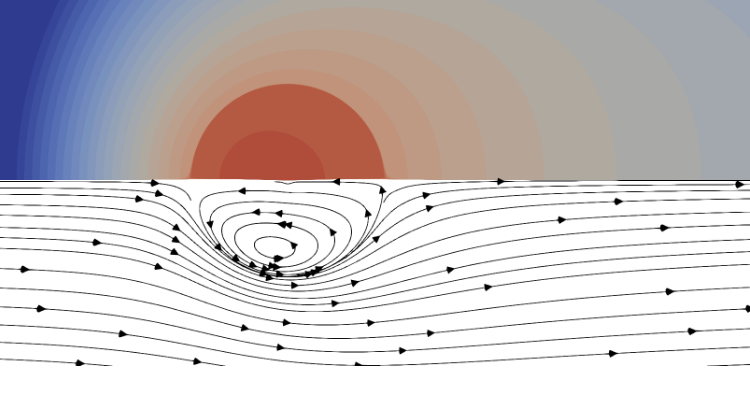
<p><img src="/assets/img/from-paper/climentpdf2.png" alt="Extracting equations and benchmark definitions from the paper" /></p>

<h2 id="then-comes-the-implementation-map">Then comes the implementation map</h2>

<p>Once the paper is readable, I want a map from the paper to the repository. In the Climent benchmark package, this means identifying whether a case belongs near an existing scalar spherical benchmark, a two-phase conjugate transfer problem, a prescribed Stokes-flow diagnostic, or a multi-species reaction block.</p>

<p>The repository already has a useful shape:</p>

<ul>
  <li>benchmark scripts such as <code class="language-plaintext highlighter-rouge">scripts/run_benchmark.jl</code>;</li>
  <li>source modules in <code class="language-plaintext highlighter-rouge">src/</code>;</li>
  <li>tests in <code class="language-plaintext highlighter-rouge">test/</code>;</li>
  <li>reference data in <code class="language-plaintext highlighter-rouge">data/reference</code> and <code class="language-plaintext highlighter-rouge">data/references</code>;</li>
  <li>generated result CSVs in <code class="language-plaintext highlighter-rouge">data/results</code>;</li>
  <li>plotting and documentation scripts.</li>
</ul>

<p>The agent should read that structure before proposing code. If a new case resembles an existing one, the right answer is usually to reuse the existing post-processing conventions and add a small benchmark path. The wrong answer is to invent a separate framework because the prompt only mentioned the paper.</p>

<h2 id="ask-for-comparisons-not-just-code">Ask for comparisons, not just code</h2>

<p>The prompts that work best are not “write the implementation.” They are comparative:</p>

<div class="language-text highlighter-rouge"><div class="highlight"><pre class="highlight"><code>Compare the equations in this paper with the existing B1 and B5 benchmark code.
Which terms are already represented?
Which assumptions differ?
Which reference quantities can be tested on the current grid?
Which rows should be marked diagnostic rather than valid?
</code></pre></div></div>

<p>This forces the agent to reason across three things at once: the paper, the current code, and the validation layer. It also gives me something to review before any file changes happen. If the mapping is wrong, the code will be wrong too.</p>

<h2 id="build-a-ladder">Build a ladder</h2>

<p>A good implementation should climb a ladder:</p>

<ol>
  <li>formula checks;</li>
  <li>geometry and post-processing checks;</li>
  <li>scalar smoke benchmarks;</li>
  <li>local convergence or resolution studies;</li>
  <li>coupled or multi-species benchmarks;</li>
  <li>paper-level campaigns and plots.</li>
</ol>

<p>This ladder is important because it prevents overclaiming. A smoke benchmark only says that the case is wired correctly. A local run gives more confidence. A paper-level campaign is slower and should be reserved for results that are meant to support a figure, a table, or a claim.</p>

<p>In the benchmark repository, this shows up through result levels, <code class="language-plaintext highlighter-rouge">usable</code> flags, under-resolution flags, geometry checks, and stored reference tables. Those details may look bureaucratic, but they are what make the output honest.</p>

<h2 id="keep-the-final-result-reviewable">Keep the final result reviewable</h2>

<p>For scientific code, “it runs” is not enough. At the end of an agent session, I want a plain report:</p>

<ul>
  <li>changed files;</li>
  <li>commands run;</li>
  <li>numerical results;</li>
  <li>uncertainty or limitations.</li>
</ul>

<p>If the agent added a benchmark, I want to know which CSV row changed, which figure can be regenerated, which test passed, and what still should not be claimed. The final answer should not sound like a press release. It should sound like a lab notebook.</p>

<h2 id="the-useful-unit">The useful unit</h2>

<p>The productive unit is not “paper to code.” It is smaller:</p>

<div class="language-text highlighter-rouge"><div class="highlight"><pre class="highlight"><code>one equation -&gt; one implementation path -&gt; one testable quantity -&gt; one result row
</code></pre></div></div>

<p>Once that path is clear, adding more benchmarks becomes less mysterious. The paper provides a case. The code provides operators. The tests provide constraints. The CSV files keep the record of what was actually checked.</p>

<p>AI agents are useful here because they can do the repetitive reading and glue work: extract equations, OCR tables, convert fragments to Markdown, inspect nearby code, draft a runner, and summarize discrepancies. They are dangerous when they flatten scientific distinctions.</p>

<p>For this kind of work, I would rather have a cautious agent that says “this reference is out of scope for the current solver” than a confident agent that makes every table look validated.</p>]]></content><author><name></name></author><category term="LLM" /><category term="scientific-computing" /><category term="Julia" /><category term="benchmarks" /><category term="numerical-methods" /><summary type="html"><![CDATA[]]></summary><media:thumbnail xmlns:media="http://search.yahoo.com/mrss/" url="https://fastaxx.github.io/assets/img/from-paper/climentpdf.png" /><media:content medium="image" url="https://fastaxx.github.io/assets/img/from-paper/climentpdf.png" xmlns:media="http://search.yahoo.com/mrss/" /></entry><entry><title type="html">Obsidian and Git for Research Notes</title><link href="https://fastaxx.github.io/2026/03/10/obsidian-git-research-notes.html" rel="alternate" type="text/html" title="Obsidian and Git for Research Notes" /><published>2026-03-10T09:00:00+00:00</published><updated>2026-03-10T09:00:00+00:00</updated><id>https://fastaxx.github.io/2026/03/10/obsidian-git-research-notes</id><content type="html" xml:base="https://fastaxx.github.io/2026/03/10/obsidian-git-research-notes.html"><![CDATA[<p><img src="/assets/img/obsidian-git/obsidian-git-research-notes.png" alt="A research desk with Markdown notes, a graph view, and Git history" /></p>

<p>Obsidian is attractive for research because it does not try to own the notes. A vault is mostly a folder of Markdown files. That sounds boring, but for long projects it is exactly the right kind of boring: readable files, local control, links that still make sense outside the application, and a structure that can be versioned with Git.</p>

<p>I do not think a research note system should become a second research project. It should be simple enough to survive deadlines, paper revisions, teaching, and the weeks where nothing is perfectly organized. My rule is: if I cannot maintain the system when I am tired, the system is too complex.</p>

<h2 id="a-small-vault-structure">A small vault structure</h2>

<p>I would start with something like this:</p>

<div class="language-text highlighter-rouge"><div class="highlight"><pre class="highlight"><code>research-notes/
  00-inbox/
  10-projects/
  20-literature/
  30-methods/
  40-meetings/
  50-teaching/
  assets/
</code></pre></div></div>

<p>The exact names do not matter much. What matters is that the folders describe the role of a note, not a perfect taxonomy of the world. A note about a paper goes in <code class="language-plaintext highlighter-rouge">20-literature/</code>. A note about a numerical scheme goes in <code class="language-plaintext highlighter-rouge">30-methods/</code>. A note about an ongoing article or code base goes in <code class="language-plaintext highlighter-rouge">10-projects/</code>.</p>

<p>The inbox is useful because not every note deserves classification immediately. A copied idea, a meeting remark, or a quick equation can live there until it becomes clear whether it belongs to a project, a method, or nowhere.</p>

<h2 id="notes-should-be-small-enough-to-link">Notes should be small enough to link</h2>

<p>The temptation is to make one giant note per project. That works for the first week, then it becomes a document you never want to open. I prefer smaller notes:</p>

<ul>
  <li>one note for a paper;</li>
  <li>one note for a method;</li>
  <li>one note for a benchmark;</li>
  <li>one note for a decision;</li>
  <li>one note for a recurring problem.</li>
</ul>

<p>Links are useful when the notes have real boundaries. A project note can link to <code class="language-plaintext highlighter-rouge">[[space-time cut-cell method]]</code>, <code class="language-plaintext highlighter-rouge">[[manufactured solution]]</code>, <code class="language-plaintext highlighter-rouge">[[Stefan problem]]</code>, or <code class="language-plaintext highlighter-rouge">[[ICCFD 2026]]</code>. The graph view is not the point, but it becomes a helpful diagnostic: isolated notes are probably unprocessed; over-connected notes may need to be split.</p>

<h2 id="git-changes-the-way-i-write-notes">Git changes the way I write notes</h2>

<p>Git is not only backup. It gives a history of thinking.</p>

<p>For research notes, commits do not need to be perfect. A useful rhythm is:</p>

<div class="language-bash highlighter-rouge"><div class="highlight"><pre class="highlight"><code>git add <span class="nb">.</span>
git commit <span class="nt">-m</span> <span class="s2">"Add notes on reactive transfer benchmarks"</span>
</code></pre></div></div>

<p>The value appears later. When a paper draft changes, when a benchmark result is replaced, or when a hypothesis quietly disappears, the history is still there. It is also easier to be honest in notes when old versions are not lost. You can rewrite a page aggressively because Git keeps the previous version.</p>

<h2 id="what-i-would-keep-out-of-the-vault">What I would keep out of the vault</h2>

<p>Not everything belongs in Obsidian. Large raw datasets, generated figures, build artifacts, and simulation outputs should usually stay elsewhere. The note should link to them, describe them, and explain why they matter. It should not become a fragile archive of everything.</p>

<p>For PDFs, I prefer a pragmatic approach. Keep the PDF somewhere stable, create a Markdown note for the paper, and write the useful content there: main question, assumptions, equations, numerical method, limitations, and why the paper matters for the current work.</p>

<h2 id="a-note-template-for-papers">A note template for papers</h2>

<div class="language-text highlighter-rouge"><div class="highlight"><pre class="highlight"><code># Paper title

## Why I opened it

## Main contribution

## Model and assumptions

## Numerical method

## Results worth reusing

## Limitations

## Links
</code></pre></div></div>

<p>The important section is “Why I opened it.” Without that, literature notes become summaries detached from the project. A paper is rarely useful in the abstract; it is useful because it answers a question, gives a method, provides a benchmark, or contradicts something.</p>

<h2 id="the-role-of-ai">The role of AI</h2>

<p>LLMs fit naturally around this workflow, but only as assistants. They can turn rough notes into a cleaner page, extract assumptions from a paper, propose links to existing notes, or produce a first draft of a meeting summary. They should not silently rewrite the record.</p>

<p>The best pattern is explicit:</p>

<div class="language-text highlighter-rouge"><div class="highlight"><pre class="highlight"><code>Read this note and propose links to existing concepts.
Do not delete information.
Separate source-backed claims from interpretation.
List uncertain points at the end.
</code></pre></div></div>

<p>That keeps the vault as a human research memory, not just a pile of generated summaries.</p>

<h2 id="my-preferred-rule">My preferred rule</h2>

<p>Every important idea should eventually have three things: a note, a link, and a reason. The note stores the idea. The link places it in the project. The reason explains why it was worth writing down.</p>

<p>Obsidian provides the writing surface. Git provides the memory. The rest is discipline.</p>]]></content><author><name></name></author><category term="Obsidian" /><category term="Git" /><category term="research" /><category term="notes" /><category term="knowledge-management" /><summary type="html"><![CDATA[]]></summary><media:thumbnail xmlns:media="http://search.yahoo.com/mrss/" url="https://fastaxx.github.io/assets/img/obsidian-git/obsidian-git-research-notes.png" /><media:content medium="image" url="https://fastaxx.github.io/assets/img/obsidian-git/obsidian-git-research-notes.png" xmlns:media="http://search.yahoo.com/mrss/" /></entry><entry><title type="html">A Prompt Template for Scientific Code Changes</title><link href="https://fastaxx.github.io/2025/12/15/a-prompt-template-for-scientific-code.html" rel="alternate" type="text/html" title="A Prompt Template for Scientific Code Changes" /><published>2025-12-15T09:00:00+00:00</published><updated>2025-12-15T09:00:00+00:00</updated><id>https://fastaxx.github.io/2025/12/15/a-prompt-template-for-scientific-code</id><content type="html" xml:base="https://fastaxx.github.io/2025/12/15/a-prompt-template-for-scientific-code.html"><![CDATA[<p>Most bad coding-agent prompts are too short in the wrong places. They say what to add, but not what scientific contract must remain true. For research code, that is risky. A small implementation detail can change a convergence rate, a sign convention, a nondimensional number, or the meaning of a validation result.</p>

<p>The prompt template I keep coming back to is deliberately structured:</p>

<div class="language-text highlighter-rouge"><div class="highlight"><pre class="highlight"><code>Objective
  Add a manufactured-solution convergence test for &lt;equation/method&gt;.

Context to read first
  Read src/&lt;operator&gt;, test/&lt;nearest existing test&gt;, docs/MATH.md.

Scientific constraints
  The exact solution is ... Evaluate L2 error at refinements [...].

Implementation contract
  Start with a plan. Make the smallest patch. Run &lt;command&gt;.

Final response
  List changed files, commands run, numerical results and uncertainty.
</code></pre></div></div>

<p>The important part is not the formatting. The important part is that the model receives the same information a careful collaborator would need before touching the code.</p>

<h2 id="objective">Objective</h2>

<p>The objective should be narrow. “Improve the solver” is too vague. “Add a manufactured-solution convergence test for the diffusion operator” is better because it defines a target and suggests what kind of evidence will count.</p>

<p>For numerical code, I try to include the equation or method name directly in the objective. That helps the model search locally and prevents it from drifting toward unrelated tests.</p>

<h2 id="context-to-read-first">Context to read first</h2>

<p>This section is the antidote to generic code. The model should read the operator, the nearest existing test, and the mathematical notes before writing anything. If the repository already has a pattern for grids, tolerances, fixtures, or error norms, the new test should follow it.</p>

<p>The phrase “nearest existing test” is useful. It tells the model to adapt local style instead of inventing a new testing framework.</p>

<h2 id="scientific-constraints">Scientific constraints</h2>

<p>This is the part that normal software prompts often miss. Scientific code needs more than input/output behavior. It needs the mathematical claim:</p>

<ul>
  <li>the exact solution;</li>
  <li>the forcing term;</li>
  <li>the boundary conditions;</li>
  <li>the refinement sequence;</li>
  <li>the norm used for the error;</li>
  <li>the expected convergence rate;</li>
  <li>the tolerance and why it is reasonable.</li>
</ul>

<p>If these are not written down, the model may choose convenient values that make the test pass without testing the intended property.</p>

<h2 id="implementation-contract">Implementation contract</h2>

<p>I usually ask for the smallest patch. Not because small patches are morally better, but because they are easier to audit. If the goal is a convergence test, I do not want an unrelated refactor of the solver, the plotting code, and the documentation in the same change.</p>

<p>The command matters too. A coding agent should know how success will be checked:</p>

<div class="language-text highlighter-rouge"><div class="highlight"><pre class="highlight"><code>Run julia --project=. -e 'using Pkg; Pkg.test()'
</code></pre></div></div>

<p>or, for a narrower pass:</p>

<div class="language-text highlighter-rouge"><div class="highlight"><pre class="highlight"><code>Run julia --project=. test/test_diffusion_operator.jl
</code></pre></div></div>

<p>The command is part of the task, not an afterthought.</p>

<h2 id="final-response">Final response</h2>

<p>The final response should be boring and factual:</p>

<ul>
  <li>changed files;</li>
  <li>commands run;</li>
  <li>numerical results;</li>
  <li>uncertainty.</li>
</ul>

<p>That last item is important. A convergence rate estimated on three grids is not the same thing as a proof. A passing smoke test is not a paper-level validation. A result that depends on a coarse geometry should say so.</p>

<h2 id="why-this-works">Why this works</h2>

<p>The template forces the model to operate inside a scientific boundary. It tells it what to read, what to preserve, how to make the change, and how to report evidence.</p>

<p>It also makes review faster. If the final answer does not list numerical results, something is missing. If no uncertainty is mentioned, the result is probably oversold. If the patch is large, it probably ignored the implementation contract.</p>

<p>For research software, a good prompt is not just a request. It is a small protocol for keeping the code, the mathematics, and the evidence aligned.</p>]]></content><author><name></name></author><category term="LLM" /><category term="prompts" /><category term="scientific-computing" /><category term="testing" /><category term="research-software" /><summary type="html"><![CDATA[Most bad coding-agent prompts are too short in the wrong places. They say what to add, but not what scientific contract must remain true. For research code, that is risky. A small implementation detail can change a convergence rate, a sign convention, a nondimensional number, or the meaning of a validation result.]]></summary></entry><entry><title type="html">🧮 Zephyr-FVM: Fine-tuning Zephyr-7B for Finite Volume Numerical Methods</title><link href="https://fastaxx.github.io/projects/2025/09/12/LLM-finetuning.html" rel="alternate" type="text/html" title="🧮 Zephyr-FVM: Fine-tuning Zephyr-7B for Finite Volume Numerical Methods" /><published>2025-09-12T12:00:00+00:00</published><updated>2025-09-12T12:00:00+00:00</updated><id>https://fastaxx.github.io/projects/2025/09/12/LLM-finetuning</id><content type="html" xml:base="https://fastaxx.github.io/projects/2025/09/12/LLM-finetuning.html"><![CDATA[<p><strong>Fine-tuning Zephyr-7B for Finite Volumes: Methodology and Results</strong></p>

<hr />

<h3 id="context-and-goal"><strong>Context and Goal</strong></h3>
<p>I wanted to test fine-tuning on a domain I know well: <strong>finite volume methods</strong> in numerical simulation. The goal was to make Zephyr-7B able to explain the concepts and schemes clearly, so it could answer technical questions on the topic.</p>

<hr />

<h3 id="data-preparation-the-heart-of-the-project"><strong>Data Preparation: The Heart of the Project</strong></h3>
<p>The quality of a fine-tune depends on the <strong>training data</strong>. I built a dataset of <strong>a few question/answer pairs</strong> covering:</p>

<ol>
  <li><strong>Theoretical concepts</strong>:
    <ul>
      <li><em>“What is the CFL condition and how do you apply it to an explicit scheme?”</em></li>
      <li><em>“What is the difference between an upwind scheme and a centered scheme for discretizing a convective term?”</em></li>
    </ul>
  </li>
  <li><strong>Practical cases</strong>:
    <ul>
      <li><em>“How do you handle a Neumann boundary condition in a finite volume solver?”</em></li>
      <li><em>“What are the stability criteria for an implicit scheme applied to the heat equation?”</em></li>
    </ul>
  </li>
  <li><strong>Method comparisons</strong>:
    <ul>
      <li><em>“What are the advantages and disadvantages of explicit vs implicit schemes?”</em></li>
      <li><em>“When should an upwind scheme be preferred over a centered scheme?”</em></li>
    </ul>
  </li>
</ol>

<p><strong>Data format</strong>:
Each example follows a standard format for <code class="language-plaintext highlighter-rouge">SFTTrainer</code>:</p>
<div class="language-python highlighter-rouge"><div class="highlight"><pre class="highlight"><code><span class="p">{</span>
  <span class="s">"text"</span><span class="p">:</span> <span class="s">"### Instruction: [Question about finite volumes]</span><span class="se">\n</span><span class="s">### Response: [Detailed technical answer]"</span>
<span class="p">}</span>
</code></pre></div></div>
<p><em>Example</em>:</p>
<div class="language-python highlighter-rouge"><div class="highlight"><pre class="highlight"><code><span class="p">{</span>
  <span class="s">"text"</span><span class="p">:</span> <span class="s">"### Instruction: Explain the CFL condition for an explicit finite volume scheme.
### Response: The CFL (Courant-Friedrichs-Lewy) condition is a stability criterion for explicit numerical schemes. For a convection problem (∂u/∂t + c∂u/∂x = 0), it is written as Δt ≤ Δx/|c|, where Δt is the time step, Δx the spatial step, and c the convection speed. For diffusion (∂u/∂t = ν∂²u/∂x²), it becomes Δt ≤ Δx²/(2ν). These conditions ensure that numerical information does not propagate faster than the physics of the problem."</span>
<span class="p">}</span>
</code></pre></div></div>

<p><strong>Why this format?</strong></p>

<ul>
  <li><strong>Clear structure</strong>: The model learns to distinguish the question (<code class="language-plaintext highlighter-rouge">Instruction</code>) from the answer (<code class="language-plaintext highlighter-rouge">Response</code>).</li>
  <li><strong>Compatibility</strong>: <code class="language-plaintext highlighter-rouge">trl</code>’s <code class="language-plaintext highlighter-rouge">SFTTrainer</code> is optimized for this format, which simplifies training.</li>
</ul>

<hr />

<h3 id="fine-tuning-methodology-zephyr-7b--lora-in-4-bit"><strong>Fine-tuning Methodology: Zephyr-7B + LoRA in 4-bit</strong></h3>
<h4 id="model-and-technique-choice"><strong>Model and Technique Choice</strong></h4>
<p>I selected <strong>Zephyr-7B</strong> for its instruction-following ability and its size, which is suitable for a consumer GPU. To reduce memory usage, I used:</p>

<ul>
  <li><strong>LoRA (Low-Rank Adaptation)</strong>: A technique that trains only a few additional weights (the “adapters”), without modifying the base model.</li>
  <li><strong>4-bit quantization</strong>: Reduces weight precision to save memory (via <code class="language-plaintext highlighter-rouge">bitsandbytes</code>).</li>
</ul>

<h4 id="technical-setup"><strong>Technical Setup</strong></h4>
<ol>
  <li><strong>Model loading</strong>:
    <div class="language-python highlighter-rouge"><div class="highlight"><pre class="highlight"><code><span class="kn">from</span> <span class="nn">transformers</span> <span class="kn">import</span> <span class="n">AutoModelForCausalLM</span><span class="p">,</span> <span class="n">BitsAndBytesConfig</span>

<span class="n">bnb_config</span> <span class="o">=</span> <span class="n">BitsAndBytesConfig</span><span class="p">(</span>
    <span class="n">load_in_4bit</span><span class="o">=</span><span class="bp">True</span><span class="p">,</span>          <span class="c1"># 4-bit quantization
</span>    <span class="n">bnb_4bit_quant_type</span><span class="o">=</span><span class="s">"nf4"</span><span class="p">,</span>  <span class="c1"># Optimal quantization type
</span>    <span class="n">bnb_4bit_compute_dtype</span><span class="o">=</span><span class="n">torch</span><span class="p">.</span><span class="n">float16</span><span class="p">,</span>  <span class="c1"># FP16 computation
</span><span class="p">)</span>

<span class="n">model</span> <span class="o">=</span> <span class="n">AutoModelForCausalLM</span><span class="p">.</span><span class="n">from_pretrained</span><span class="p">(</span>
    <span class="s">"HuggingFaceH4/zephyr-7b-beta"</span><span class="p">,</span>
    <span class="n">quantization_config</span><span class="o">=</span><span class="n">bnb_config</span><span class="p">,</span>
    <span class="n">device_map</span><span class="o">=</span><span class="s">"auto"</span><span class="p">,</span>  <span class="c1"># Automatically uses the GPU
</span><span class="p">)</span>
</code></pre></div>    </div>
  </li>
  <li><strong>LoRA setup</strong>:
    <div class="language-python highlighter-rouge"><div class="highlight"><pre class="highlight"><code><span class="kn">from</span> <span class="nn">peft</span> <span class="kn">import</span> <span class="n">LoraConfig</span>

<span class="n">lora_config</span> <span class="o">=</span> <span class="n">LoraConfig</span><span class="p">(</span>
    <span class="n">r</span><span class="o">=</span><span class="mi">8</span><span class="p">,</span>                     <span class="c1"># LoRA matrix rank (smaller = fewer parameters)
</span>    <span class="n">lora_alpha</span><span class="o">=</span><span class="mi">32</span><span class="p">,</span>           <span class="c1"># Scaling factor
</span>    <span class="n">target_modules</span><span class="o">=</span><span class="p">[</span><span class="s">"q_proj"</span><span class="p">,</span> <span class="s">"k_proj"</span><span class="p">,</span> <span class="s">"v_proj"</span><span class="p">,</span> <span class="s">"o_proj"</span><span class="p">],</span>  <span class="c1"># Target layers
</span>    <span class="n">lora_dropout</span><span class="o">=</span><span class="mf">0.05</span><span class="p">,</span>       <span class="c1"># Dropout to reduce overfitting
</span>    <span class="n">bias</span><span class="o">=</span><span class="s">"none"</span><span class="p">,</span>             <span class="c1"># No bias in the adapters
</span>    <span class="n">task_type</span><span class="o">=</span><span class="s">"CAUSAL_LM"</span><span class="p">,</span>   <span class="c1"># Task type (language model)
</span><span class="p">)</span>
</code></pre></div>    </div>
  </li>
  <li><strong>Preparing the model for LoRA</strong>:
    <div class="language-python highlighter-rouge"><div class="highlight"><pre class="highlight"><code><span class="n">model</span> <span class="o">=</span> <span class="n">prepare_model_for_kbit_training</span><span class="p">(</span><span class="n">model</span><span class="p">)</span>  <span class="c1"># Prepares the model for LoRA
</span><span class="n">model</span> <span class="o">=</span> <span class="n">get_peft_model</span><span class="p">(</span><span class="n">model</span><span class="p">,</span> <span class="n">lora_config</span><span class="p">)</span>      <span class="c1"># Applies LoRA
</span></code></pre></div>    </div>
  </li>
</ol>

<h4 id="memory-optimizations"><strong>Memory Optimizations</strong></h4>
<p>To avoid <code class="language-plaintext highlighter-rouge">CUDA out of memory</code> errors on a T4 GPU (15 GB of VRAM), I:</p>

<ul>
  <li>Reduced the batch size: <code class="language-plaintext highlighter-rouge">per_device_train_batch_size=2</code>.</li>
  <li>Used gradient accumulation: <code class="language-plaintext highlighter-rouge">gradient_accumulation_steps=8</code> (equivalent to a batch size of 16).</li>
  <li>Limited the sequence length: <code class="language-plaintext highlighter-rouge">max_seq_length=256</code>.</li>
  <li>Cleared memory before training:
    <div class="language-python highlighter-rouge"><div class="highlight"><pre class="highlight"><code><span class="kn">import</span> <span class="nn">torch</span><span class="p">,</span> <span class="n">gc</span>
<span class="n">torch</span><span class="p">.</span><span class="n">cuda</span><span class="p">.</span><span class="n">empty_cache</span><span class="p">()</span>
<span class="n">gc</span><span class="p">.</span><span class="n">collect</span><span class="p">()</span>
</code></pre></div>    </div>
  </li>
</ul>

<hr />

<h3 id="training-parameters-and-results"><strong>Training: Parameters and Results</strong></h3>
<h4 id="training-parameters"><strong>Training Parameters</strong></h4>
<div class="language-python highlighter-rouge"><div class="highlight"><pre class="highlight"><code><span class="kn">from</span> <span class="nn">transformers</span> <span class="kn">import</span> <span class="n">TrainingArguments</span>

<span class="n">training_args</span> <span class="o">=</span> <span class="n">TrainingArguments</span><span class="p">(</span>
    <span class="n">output_dir</span><span class="o">=</span><span class="s">"zephyr-volumes-finis"</span><span class="p">,</span>      <span class="c1"># Output directory
</span>    <span class="n">per_device_train_batch_size</span><span class="o">=</span><span class="mi">2</span><span class="p">,</span>          <span class="c1"># Batch size
</span>    <span class="n">gradient_accumulation_steps</span><span class="o">=</span><span class="mi">8</span><span class="p">,</span>          <span class="c1"># Gradient accumulation
</span>    <span class="n">learning_rate</span><span class="o">=</span><span class="mf">2e-4</span><span class="p">,</span>                     <span class="c1"># Learning rate
</span>    <span class="n">num_train_epochs</span><span class="o">=</span><span class="mi">3</span><span class="p">,</span>                     <span class="c1"># Number of epochs
</span>    <span class="n">fp16</span><span class="o">=</span><span class="bp">True</span><span class="p">,</span>                              <span class="c1"># Mixed precision (FP16)
</span>    <span class="n">save_steps</span><span class="o">=</span><span class="mi">50</span><span class="p">,</span>                          <span class="c1"># Periodic checkpoints
</span>    <span class="n">logging_steps</span><span class="o">=</span><span class="mi">10</span><span class="p">,</span>                       <span class="c1"># Periodic logs
</span>    <span class="n">optim</span><span class="o">=</span><span class="s">"paged_adamw_8bit"</span><span class="p">,</span>                <span class="c1"># Memory-efficient optimizer
</span>    <span class="n">report_to</span><span class="o">=</span><span class="s">"none"</span><span class="p">,</span>                       <span class="c1"># Disable Weights &amp; Biases
</span><span class="p">)</span>
</code></pre></div></div>

<h4 id="running-training"><strong>Running Training</strong></h4>
<div class="language-python highlighter-rouge"><div class="highlight"><pre class="highlight"><code><span class="kn">from</span> <span class="nn">trl</span> <span class="kn">import</span> <span class="n">SFTTrainer</span>

<span class="n">trainer</span> <span class="o">=</span> <span class="n">SFTTrainer</span><span class="p">(</span>
    <span class="n">model</span><span class="o">=</span><span class="n">model</span><span class="p">,</span>
    <span class="n">args</span><span class="o">=</span><span class="n">training_args</span><span class="p">,</span>
    <span class="n">train_dataset</span><span class="o">=</span><span class="n">dataset</span><span class="p">,</span>          <span class="c1"># Prepared dataset
</span>    <span class="n">peft_config</span><span class="o">=</span><span class="n">lora_config</span><span class="p">,</span>        <span class="c1"># LoRA configuration
</span>    <span class="n">max_seq_length</span><span class="o">=</span><span class="mi">256</span><span class="p">,</span>             <span class="c1"># Maximum sequence length
</span><span class="p">)</span>

<span class="n">trainer</span><span class="p">.</span><span class="n">train</span><span class="p">()</span>  <span class="c1"># Start training
</span></code></pre></div></div>

<h4 id="results-and-observations"><strong>Results and Observations</strong></h4>
<ul>
  <li><strong>Duration</strong>: ~ minutes for 3 epochs on a few examples (T4 GPU).</li>
  <li><strong>Loss progression</strong>:
    <ul>
      <li><strong>Epoch 1</strong>: Loss ~0.5 (the model is learning the answer structure).</li>
      <li><strong>Epoch 2</strong>: Loss ~0.25 (the answers become more precise).</li>
      <li><strong>Epoch 3</strong>: Loss ~0.15 (stabilization, correct generalization).</li>
    </ul>
  </li>
  <li><strong>Answer quality</strong>:
    <ul>
      <li>The model generates <strong>precise technical explanations</strong>, even for questions not present in the dataset.</li>
      <li>The responses are <strong>structured</strong> and <strong>context-aware</strong> (for example, convection/diffusion distinctions).</li>
    </ul>
  </li>
</ul>

<p><em>Example generated answer</em> for <em>“What are the advantages of an implicit scheme?”</em>:</p>
<blockquote>
  <p>*“An implicit scheme has three major advantages:</p>
</blockquote>

<blockquote>
  <ol>
    <li><strong>Unconditional stability</strong>: Unlike explicit schemes, it is not subject to the CFL condition, which allows larger time steps (Δt ≫ Δx²/(2ν) for diffusion).</li>
    <li><strong>Time accuracy</strong>: By avoiding restrictions on Δt, it better captures slow dynamics (for example, diffusion over long periods).</li>
    <li><strong>Robustness</strong>: Less sensitive to numerical instabilities, even for stiff problems (for example, equations with strong source terms).
<em>Drawback</em>: It requires solving a linear system at each time step, which increases the computational cost (tridiagonal matrix for 1D problems).”*</li>
  </ol>
</blockquote>

<hr />

<h3 id="validation-and-limits"><strong>Validation and Limits</strong></h3>
<p>To validate the model, I tested it on <strong>questions not present in the dataset</strong>:</p>

<ol>
  <li><em>“How do you discretize a source term in the convection-diffusion equation?”</em>
→ A coherent answer explaining how the source term is integrated into the flux balance.</li>
  <li><em>“What is the influence of the mesh on the accuracy of a finite volume scheme?”</em>
→ A detailed answer about truncation error and convergence.</li>
</ol>

<p><strong>Identified limits</strong>:</p>

<ul>
  <li><strong>Limited precision</strong> for very specific problems (for example, 3D unstructured meshes).</li>
  <li><strong>Dataset dependence</strong>: The model generalizes well within its training domain, but may lack detail for uncovered cases.</li>
</ul>

<hr />

<h3 id="future-improvements"><strong>Future Improvements</strong></h3>
<ol>
  <li><strong>Expand the dataset</strong>:
    <ul>
      <li>Add examples on <strong>non-uniform meshes</strong>, <strong>2D/3D problems</strong>, and <strong>high-order schemes</strong>.</li>
      <li>Include cases with <strong>source terms</strong> or <strong>chemical reactions</strong> (for example, a reaction-diffusion equation).</li>
    </ul>
  </li>
  <li><strong>Optimize training</strong>:
    <ul>
      <li>Test with <strong>more epochs</strong> (5-10) to improve accuracy.</li>
      <li>Use a <strong>validation set</strong> to evaluate generalization.</li>
    </ul>
  </li>
  <li><strong>Practical integration</strong>:
    <ul>
      <li>Develop an <strong>API</strong> to interact with the model through a web interface.</li>
      <li>Create a <strong>Jupyter notebook</strong> with interactive PDE-solving examples.</li>
    </ul>
  </li>
</ol>

<hr />

<h3 id="conclusion"><strong>Conclusion</strong></h3>
<p>This project shows that a large model like Zephyr-7B can be adapted to a specific technical domain with little data and training time. The model already answers finite volume questions correctly and explains the concepts clearly.</p>

<p><strong>Why is this useful?</strong></p>
<ul>
  <li>Saves time when looking for explanations.</li>
  <li>Gives pedagogical answers adapted to the audience.</li>
  <li>Can be extended to other numerical methods.</li>
</ul>

<p><strong>Next steps</strong>:</p>
<ul>
  <li>…</li>
</ul>

<hr />
<p><strong>Project link</strong>: <a href="https://gist.github.com/Fastaxx/b0d30039ba9245d5313111ad90a5b0fe">GitHub Gist</a></p>]]></content><author><name></name></author><category term="projects" /><category term="AI" /><category term="finite-volumes" /><category term="Zephyr-7B" /><category term="LoRA" /><category term="finetuning" /><category term="numerical-methods" /><category term="Python" /><category term="PyTorch" /><summary type="html"><![CDATA[Fine-tuning Zephyr-7B for Finite Volumes: Methodology and Results]]></summary><media:thumbnail xmlns:media="http://search.yahoo.com/mrss/" url="https://fastaxx.github.io/assets/img/zephyr-fvm/architecture.png" /><media:content medium="image" url="https://fastaxx.github.io/assets/img/zephyr-fvm/architecture.png" xmlns:media="http://search.yahoo.com/mrss/" /></entry></feed>